


Optimizing Wi-Fi with 80 Mhz Channels
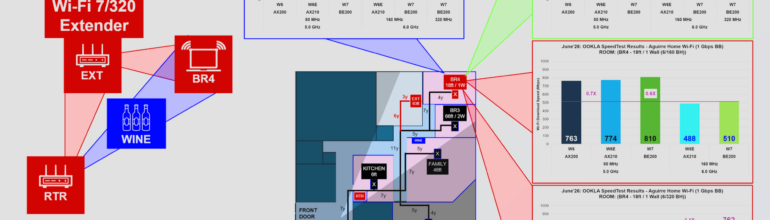
Intel Sr. Marketing Director Carlos Aguirre has posted a very interesting article about optimizing the Wi-Fi in his home in Arizona. He finds that the key to top performance across all of the rooms in his 5,000 sq. ft. home is an 80 MHz wide, 5 GHz backhaul link from the central router to a satellite.
In the first pass, Aguire finds that all but two rooms can register Ookla speed test scores of 830-940 Mbps over a gigabit (really 940 Mbps) ISP connection. This is impressive as several of the rooms are getting signals that have to penetrate two walls while travelling as far as 66 feet.
Two rooms had issues, however. A bedroom 51 feet and 3 walls from the router fell to 614 Mbps, and another, separated by 78 feet and 4 walls, limped along at 194 Mbps. Unfortunately, the slowest speeds were delivered to a gamer who wasn’t at all happy with his Wi-Fi.
Solving the Gamer’s Problem
Aguirre surmises that the gamer’s signal was attenuated by a wine closet between the router and the his room. This makes sense to me because I once lived in a house with a saltwater aquarium between my Wi-Fi router and my home office. Wi-Fi really doesn’t like water.
As one does, Aguirre addresses the wine problem by installing a satellite access point midway between his router and the gamer’s room. While many of us would wire the AP to the router, Aguirre takes the bold move of connecting it with 6 GHz wireless backhaul.
This is where the design choices made by the (unspecified) router manufacturer come into play. Satellite APs need separate radios for fronthaul and backhaul to relay packets most efficiently. While some vendors split the 6 GHz band in half in order to deploy a pair of 6 GHz radios, Aguirre’s isn’t one of them.
Disappointing Initial Results
Running over 6 GHz, 320 Mhz backhaul, the satellite-assisted gamer link increased to 762 Mbps. While many of us would declare victory at this point, the gamer wasn’t satisfied with the fact that his siblings were getting 900 Mbps plus. All parents can relate.
Aguirre’s next move was to reduce channel size to 160, but that only made matters worse. He found the solution by switching the backhaul to 80 MHz in the 5 GHz band: 932 Mbps, barely shy of the 940 maximum.
This had the effect to slowing down the native 5 GHz devices, but that was something the Aguirres could live with. With some routers, it would be possible to assign the backhaul to a different frequency than the one used by the legacy devices, but this option runs into the single radio/multiple band problem.
What is the Real Bottleneck?
The primary takeaway from the Aguirre home is that you can’t expect to cover an entire eight room, 5,000 sq. ft. home from a single Wi-Fi radio without significant losses of performance at the periphery. Even with the addition of a satellite access point to solve the gamer kid’s problem, the daughter’s room is still pretty pokey.
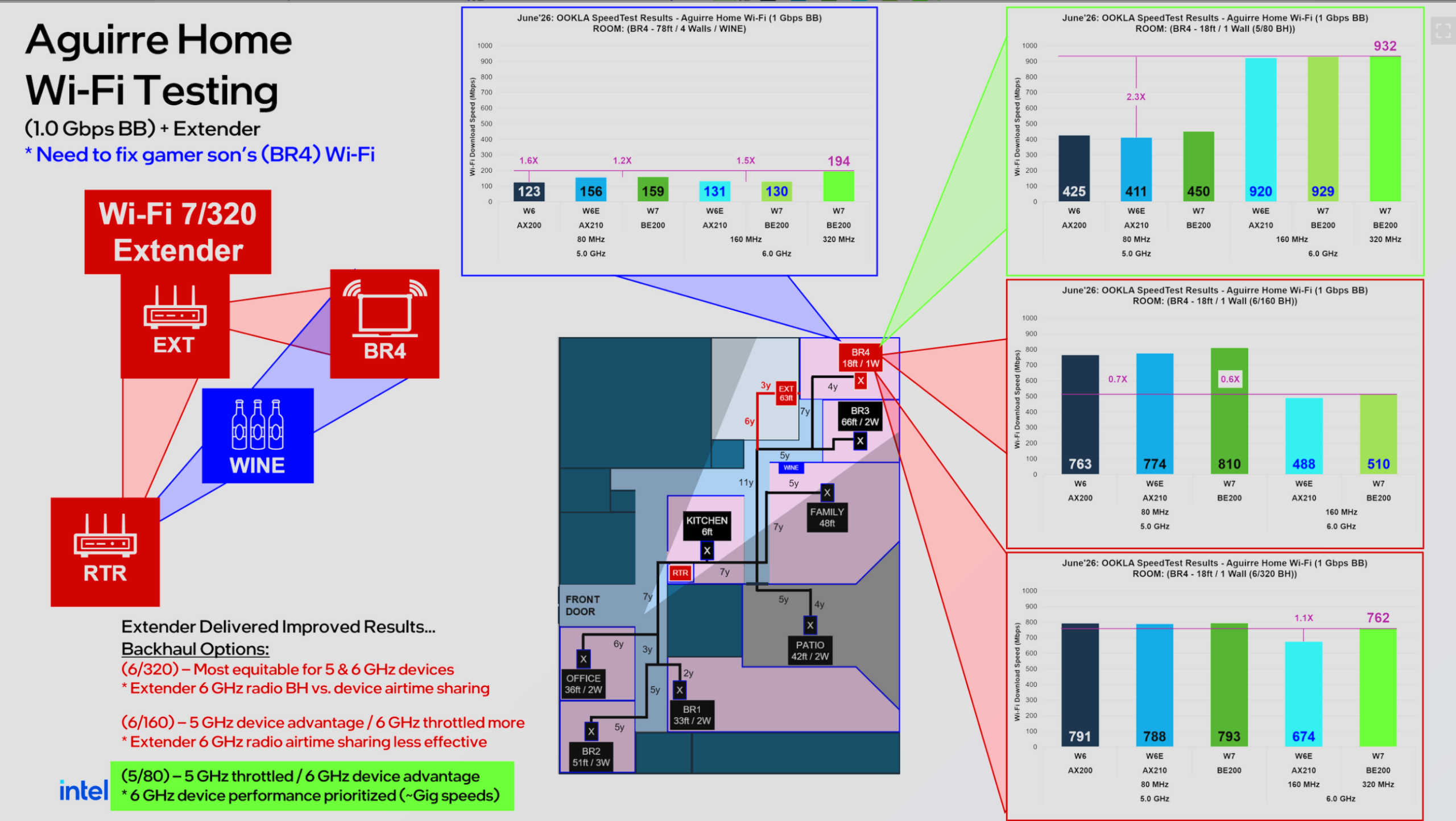
The second takeaway is that peak performance in a mixed-use environment is achieved with 80 MHz channels. The backhaul link between the access point serving the gamer room and the router is 80MHz, and the end-to-end speed for that room is as good as it gets in this home.
Third, and most important to policy makers, is the fact that many of the performance issues we believe to be spectrum-driven actually come down to insufficient radios. Although the US allocates 1200 MHz to Wi-Fi, the ability to use that spectrum depends on the number of radio circuits in attached devices.
Wi-Fi Multi-Link Operation Isn’t Real
When you only have one radio for a spectrum band, you can’t use any more of that band from a given device than that one little radio can use at any given time. This is why 6 GHz backhaul for Wi-Fi access points is a mirage.
The single radio can’t do two things at once: it’s either talking to the router or to the gaming device at time. MLO has a similar problem. The Wi-Fi 802.11be standard had to distinguish four types of MLO because full implementation requires two radios per band rather than the one found in all of today’s Wi-Fi adapters.
Dual radios are hard to provide in battery powered, personal devices for two reasons: transmitters consume power, so the more you have the bigger (and heavier) your battery needs to be. This is serious, but the other reason is even more serious: it’s hard to design a dual transmitter that doesn’t interfere with itself. When transmitters and receivers are operating at the same time, the receiver has to be smart enough to reject not just one, well-integrated transmitter but to also reject the signals from the other, less well-integrated one.
Four Modes of MLO
The standard defines four flavors of MLO:
1. Multi-Link Single Radio (MLSR)
Uses a single radio that can only tune to one band at a time. The device dynamically hops between bands depending on which offers the best connection. Most common, easiest to design.
2. Enhanced Multi-Link Single Radio (eMLSR)
A smarter version of MLSR. The single radio primarily listens to multiple bands simultaneously so it knows what’s happening on each link, but it only transmits on a single dynamically selected band at any given time. Only a little harder than the base mode.
3. Non-Simultaneous Transmit and Receive (NSTR)
Requires multiple radios, but they are synchronized. All active links must perform the same action at the same time (e.g., all links receive, then all links transmit), avoiding self-interference but adding minor scheduling delays. Essentially useless.
4. Simultaneous Transmit and Receive (STR)
True MLO, requiring multiple independent radios. Devices can transmit and receive on two separate bands at the exact same time without interference. It yields the lowest latency and highest throughput, but consumes more power. A real solution to the lack of parallelism in standard Wi-Fi; true full duplex operation à la 5G. The one true STR adapter on today’s market is the Ubiquiti AirWire, a truly underwhelming USB-connected adapter the size of an Apple TV box.
Intel touts the benefits of eMLSR because single transmitter is as good as their product line gets. There are some benefits, but they come in the very limited case where truly mobile devices need to change channels when they go from outdoor to indoor or vice versa.
Wi-Fi 7 is Spectrum-Rich and Radio-Poor
The FCC’s 1,200 MHz Wi-Fi allocation is literally more spectrum than the industry is able to use. I’d like to see Wi-Fi chip and system designers spend more research money on simultaneity and parallelism than on ever fatter channels.
Fat channels are a way to simulate parallelism by reducing the airtime needed to transmit and receive packets, but the simulation is never going to be as good as the real thing. Simulated parallelism doesn’t allow us to do many things at once (such as full duplex transmit and receive,) which should be the goal of radio-based networking.
When people talk about spectrum sharing, we tend to think they mean multiple users operating over the same time, but the reality is that spectrum sharing is merely a simulation that allows us to switch back and forth between transmitting and receiving fast enough for the the system to feel like it’s simultaneous.
Incentives to Get Real
We’re only going to get from where we are to where we need to be by making the shortest steps in the right direction. As long as Wi-Fi spectrum is free and only limited by how well the Wi-Fi industry can lobby the FCC, progress is going to be slow.
Let’s learn by digesting the shortcomings of current Wi-Fi implementations. It’s not a celebration of brilliant Wi-Fi engineering to carry Wi-Fi 7 signals over the equivalent of Wi-Fi 5 backhaul implementations, it’s an admission of failure.
Regulators should simply refuse to allocate more free spectrum to Wi-Fi until we have products on the market that support multiple radios in the 5 and 6 GHz bands. There’s no use in throwing good money after bad.